Nützliche Links:
- https://linuxmusician.com/how-to-install-and-configure-jack-audio-on-linux/
- https://jackaudio.org/applications/
- https://wiki.archlinux.org/title/USB_MIDI_keyboards
- http://synthesizeracademy.com
- https://www.bonedo.de/artikel/synthesizer-basics-folge-1/2/
- http://vco1.de/#Podcast
- https://www.youtube.com/watch?v=UxGswh6XLto
- https://www.youtube.com/@DasDoktorchen/videos
Nützliche Software, zur Installation empfohlen:
- audacity (Multitrack)
- Yoshimi (Synthesizer)
- amsynth (Synthesizer)
Vorbereitende Arbeiten:
Um Probleme aus dem Weg zu gehen, kann man seine User-ID (nehmen wir einmal an, diese
würde "userxy" heißen) von Rewt in die Gruppe "audio" aufnehmen lassen, z. B.:
/etc/group:
(...)
audio:x:29:pulse,userxy
(...)
DAW:
Eine DAW (Digital Audio Workstation) ist ein Verbund digitaler Geräte zur Aufzeichnung und Verarbeitung
von Schallsignalen bei Tonaufnahmen, Musikproduktionen, Abmischung und Mastering, das sich durch eine hohe
Integration der Komponenten auszeichnet. Heute versteht man darunter oft ein Computersystem mit entsprechender
Hardware und Musiksoftware (Wikipedia)
LV2:
LV2 ist eine Programmierschnittstelle für Audio-Plug-Ins zur Kommunikation zwischen Host-Anwendungen, Filtern
und Audio-Effekten unter Linux. LV2 ist der Nachfolger von LADSPA (Linux Audio Developer's Simple Plugin API)
VST:
VST steht für Virtual Studio Technology, ein Quasi-Instustrie-Standard von Steinberg Media Technologies für
sein Sequenzer-Programm "Cubase" entwickelt.
LMMS:
LMMS steht für Linux MultiMedia Studio, ist kein Synthesizer sondern eine komplette DAW (Digital Audio Worksation, s.o.)
Midi-Keyboard:
Im Juni 2025 habe ich mir das Midi-Keyboard Impact LX49+ von Nektar gekauft.
Ziel ist es, Blender-Filme mit interessanter Musik zu unterlegen, ohne in Copyright-Probleme hineinzulaufen.
Das Keyboard wird via USB an den PC angestöpselt.
Erstens: Wird ganz allgemein ein Midi-Gerät am USB-Port erkannt? - Kontrolle:
user@systemname:~$ lsusb
Bus 001 Device 006: ID 2467:2015 Nektar Impact LX49+
Zweitens: Wird das erkannte Midi-Gerät von ALSA ebenfalls erkannt? - Kontrolle via
aconnect -i und aconnect -o (Midi Input Device, Midi Output Device).
Acconect ist ein Utility, mit dem man zwei verschiedene ALSA Ports miteinander verbinden oder
bereits gesetzte Verbindungen wieder lösen kann. Ferner kann Aconnect mit der Option "-i" aktuelle
Ports anzeigen:
user@systemname:~$ acconect -i
client 0: 'System' [type=Kernel]
0 'Timer '
1 'Announce '
client 14: 'Midi Through' [type=Kernel]
0 'Midi Through Port-0'
client 20: 'Impact LX49+' [type=Kernel,card=1]
0 'Impact LX49+ MIDI1'
1 'Impact LX49+ MIDI2'
user@systemname:~$ aconnect -o
client 14: 'Midi Through' [type=Kernel]
0 'Midi Through Port-0'
client 20: 'Impact LX49+' [type=Kernel,card=1]
0 'Impact LX49+ MIDI1'
Wenn wir ALSA verwenden wollen, um MIDI-Connections zu verwenden (und eben nicht JACK):
Drittens: Für Verwendung unter ALSA brauchen wir das Paket: aconnectgui
(und wenn wir das nicht schon haben: alsa-utils) installierbar mit Synaptic.
Viertens: ALSA handelt das MIDI Routing. Um die MIDI-Verbindungen anzuzeigen, verwenden wir aconnect -l:
user@systemname:~$ aconnect -l
(...)
client 0: 'System' [type=Kernel]
0 'Timer '
1 'Announce '
client 14: 'Midi Through' [type=Kernel]
0 'Midi Through Port-0'
client 20: 'Impact LX49+' [type=Kernel,card=1]
0 'Impact LX49+ MIDI1'
1 'Impact LX49+ MIDI2'
Fünftens: Das mit dem Paket "alsa-utils" mitgelieferte Programm "aseqdump" kommt nun zum Einsatz:
=> Das Programm erzeugt einen ALSA Sequiencer Port und man kann Input Devices darauf subskribieren (s.u.)
=> Das Programm zeigt nach dem korrekten Binding, ob Tastenanschläge auf dem Keyboard beim PC ankommen.
Allgemein: Die vom obigen Befehl "aconnect -i" ermittelte Client-Nummer (das ist die #20
- und nicht die #14, das ist nämlich Midi Through!) pollen wir nun mal:
user@systemname:~$ aseqdump -p 20
Waiting for data. Press Ctrl+C to end.
Source Event Ch Data
20:0 Control change 0, controller 11, value 0
Wenn wir nun auf dem Midi-Keyboard einige Tasten anschlagen, erscheint jeweils eine Infozeile in der Konsole:
Source Event Ch Data
20:0 Control change 0, controller 11, value 0
20:0 Note on 0, note 48, velocity 35
20:0 Note off 0, note 48, velocity 0
20:0 Note on 0, note 60, velocity 17
20:0 Note on 0, note 64, velocity 24
20:0 Note off 0, note 60, velocity 0
20:0 Note off 0, note 64, velocity 0
Auch wenn wir an Drehreglern auf dem Midi-Keyboard "herumspielen", werden diese als Infozeilen sichtbar
(halt nicht als Note non/off, sondern als Control change - dabei hat jeder Regler seine eigene Nummer...)
20:0 Control change 15, controller 30, value 97
20:0 Control change 15, controller 30, value 98
20:0 Control change 15, controller 30, value 99
20:0 Control change 15, controller 110, value 127
20:0 Control change 15, controller 110, value 0
Auf diese Weise kann man beweisen, dass das Zusammenspiel der Signale vom Midi-Keyboard zum PC funktioniert.
Durchreichen der Keyboard-Einstellungen an Software-Synthesizer:
Wenn man auf dem Nektar LX49+ die Taste "Prset" (diese befindet sich in der Mitte, unterhalb der LED-ANzeige)
aktiviert (sie leuchtet dann weiß auf), werden die Dreh- und Schieberegler-Veränderungen, die man am
Keyboard macht, auf den Synthesizer übertragen, d.h. man spart sich die mühselige Bedienung
mit der Maus am Bildschirm.
Synthesizer Yoshimi
Als Synthesizer verwende ich erst einmal Yoshimi. Er bringt einige Banks mit, bei denen ich folgende
Einstellungen interessant fand:
| Bank | Sound-ID
/ Bezeichnung | Beschreibung |
| Bank 5: Arpeggios |
3. Arpeggio 3 |
Rechts-und links toggelnder kurzer Sound |
| Bank 5: Arpeggios |
34. Sequence 2 |
|
| Bank 25: Cormi Sound |
76. Pinkollo |
Panflöte mit zuviel Hall |
| Bank 25: Cormi Sound |
106, Entropia |
Scifi |
| Bank 40: Fantasy |
6. Space Synth Brass |
Fernseh-Titelmelodie |
| Bank 50: Misc |
33. Trash Synth 1 |
Schocker |
| Bank 95: Synth |
37. Resonance Synth |
Kurz anschlagen: Echo erscheint |
| Bank 105: Mysterious Bank |
30. cool organ 2 |
Deep Purple: Child in Time-Orgel |
| Bank 105: Mysterious Bank |
52. another planet |
Scifi |
| Bank 105: Mysterious Bank |
54. another space |
Scifi |
| Bank 105: Mysterious Bank |
58. echoes |
Woodhenge-like |
| Bank 110: Will Godfrey Collection |
7. ethereal |
Soft tronic |
| Bank 110: Will Godfrey Collection |
24. full strings |
Matrix like |
| Bank 110: Will Godfrey Collection |
40. Master synth low |
Orchestral, episch |
Fiddling around with Bristol:
Bristol kann folgende "alte" Synthesizer emulieren:
              moog mini
              moog explorer (voyager)
              moog voyager electric blue
              moog memory
              moog sonic 6
              moog/realistic mg-1 concertmate
              hammond module (deprecated, use -b3)
              hammond B3 (default)$
              sequential circuits prophet-5
              sequential circuits prophet-5/fx
              sequential circuits prophet-10
              sequential circuits pro-one
              fender rhodes mark-I stage 73
              fender rhodes bass piano
              crumar roadrunner electric piano
              crumar bit 01
              crumar bit 99
              crumar bit + mods
              crumar stratus synth/organ combo
              crumar trilogy synth/organ/string combo
              oberheim OB-X
              oberheim OB-Xa
              arp axxe
              arp odyssey
              arp 2600
              arp/solina string ensemble
              korg polysix
              korg poly-800
              korg mono/poly
              korg ms20 (unfinished: -libtest only)
              vox continental
              vox continental super/300/II
              roland juno-60
              roland jupiter-8
              baumann bme-700
              bristol bassmaker sequencer
              yamaha dx-7
              yamaha cs-80 (unfinished)
              commodore-64 SID chip synth
              commodore-64 SID polyphonic synth (unfinished)
              granular synthesiser (unfinished)
              ems synthi-a (unfinished)


 entsprechend:

              Option:            Emulierter Synthesizer:
              ------------------------------------------
              -mini              - moog mini
              -explorer          - moog voyager
              -voyager           - moog voyager electric blue
              -memory            - moog memory
              -sonic6            - moog sonic 6
              -mg1               - moog/realistic mg-1 concertmate
              -hammond           - hammond module (deprecated, use -b3)
              -b3                - hammond B3 (default)
              -prophet           - sequential circuits prophet-5
              -pro52             - sequential circuits prophet-5/fx
              -pro10             - sequential circuits prophet-10
              -pro1              - sequential circuits pro-one
              -rhodes            - fender rhodes mark-I stage 73
              -rhodesbass        - fender rhodes bass piano
              -roadrunner        - crumar roadrunner electric piano
              -bitone            - crumar bit 01
              -bit99             - crumar bit 99
              -bit100            - crumar bit + mods
              -stratus           - crumar stratus synth/organ combo
              -trilogy           - crumar trilogy synth/organ/string combo
              -obx               - oberheim OB-X
              -obxa              - oberheim OB-Xa
              -axxe              - arp axxe
              -odyssey           - arp odyssey
              -arp2600           - arp 2600
              -solina            - arp/solina string ensemble
              -polysix           - korg polysix
              -poly800           - korg poly-800
              -monopoly          - korg mono/poly
              -ms20              - korg ms20 (unfinished: -libtest only)
              -vox               - vox continental
              -voxM2             - vox continental super/300/II
              -juno              - roland juno-60
              -jupiter           - roland jupiter-8
              -bme700            - baumann bme-700
              -bm                - bristol bassmaker sequencer
              -dx                - yamaha dx-7
              -cs80              - yamaha cs-80 (unfinished)
              -sidney            - commodore-64 SID chip synth
              -melbourne         - commodore-64 SID polysynth (unfinished)
              -granular          - granular synthesiser (unfinished)
              -aks               - ems synthi-a (unfinished)
              -mixer             - 16 track mixer (unfinished: -libtest only)
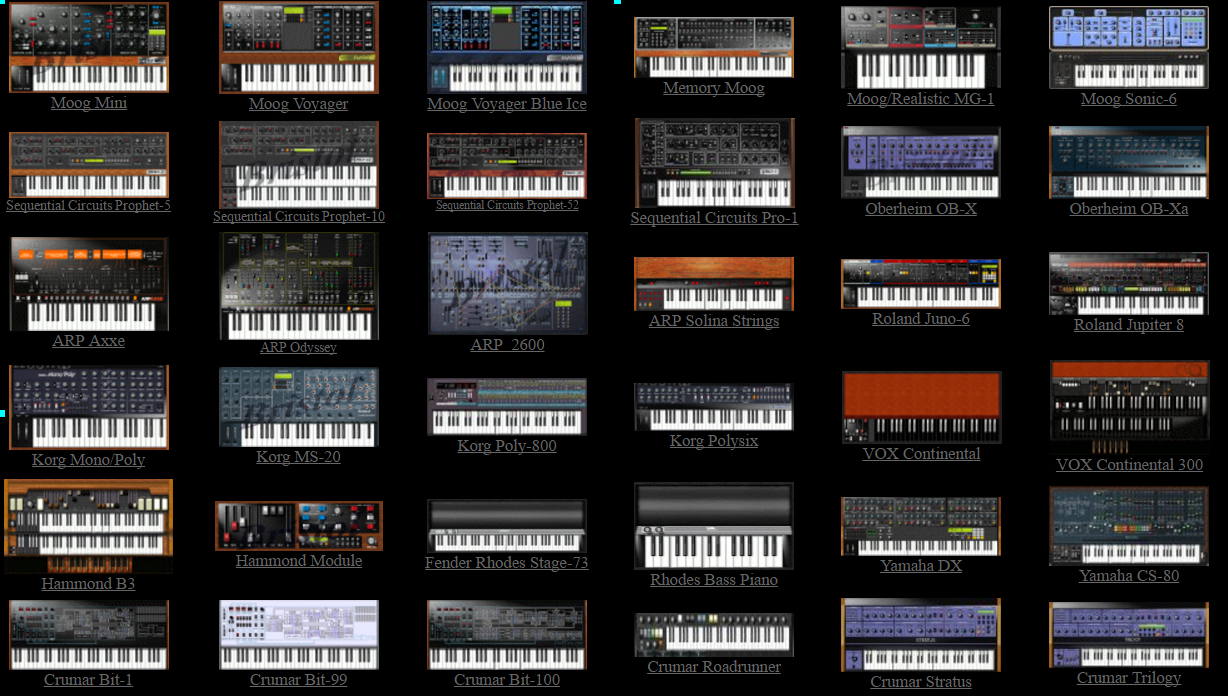
Beispiele zum Starten von Kommandozeile aus:
user@systemname:~$ startBristol -alsa -mini
user@systemname:~$ startBristol -alsa -memory
user@systemname:~$ startBristol -alsa -juno
user@systemname:~$ startBristol -alsa -solina
Nachdem der Synthesizer gestartet und sein Bild angezeigt wird, kann man in einer zweiten Konsole
nachsehen, welche Client-IDs belegt sind:
user@systemname:~$ aconnect -l
(...)
client 20: 'Impact LX49+' [type=Kernel,card=1]
0 'Impact LX49+ MIDI1'
1 'Impact LX49+ MIDI2'
client 128: 'bristol' [type=User,pid=3393]
0 'bristol input
(...)
Verbinden des Bristol-Synthesizers mit dem Midi-Keyboard:
Nachdem! der Synthesizer sichtbar ist, geschieht dies durch den
Konsolen-Befehl: aconnect <Out-Nummer> <In-Nummer>
In unserem Fall: Wir verbinden "Out" vom Midi-Keyboard #20 mit "In" #128 vom Bristol-Sythesizer:
user@systemname:~$ aconnect 20 128
ALSA oder JACK?
ALSA ist für denjenigen Anwender gedacht, der einfach mal schnell Musik aufnehmen und wiedergeben will.
ALSA läuft mit fast jeder Soundkarte, aber ist für komplizierte Szenarios nicht so gut geeignet.
JACK (Jack Audio Connection Kit) ist ein "advanced Sound Server" und wird eher im professionellen Umfeld eingesetzt. Insbesondere ist JACK auf geringe Latenzen ausgerichtet,
auf Multitrack- und MIDI-Fähigkeit und nahtlosem Ineinandergreifen und Agieren von Soundprogrammen miteinander.
Man kann beide Soundsysteme einsetzen - je nach Bedarf wird eben das eine oder das andere angeworfen.
JACK:
Installation: Unter Debian vorinstalliert.
Setup:
Check: In der Konsole ruft man das Userinterface zu JACK auf:
user@systemname:~$ qjackctl
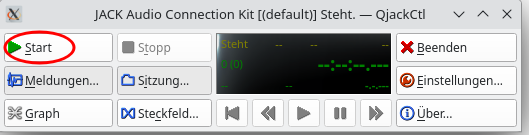
Nun kann man versuchen, den JACK-Server zu starten:
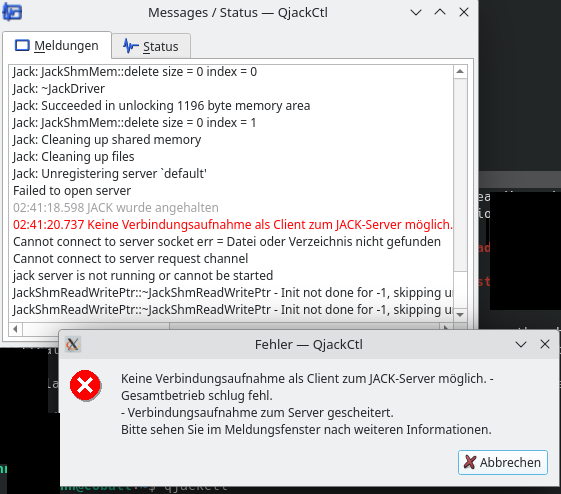
Falls Probleme auftauchen:
Prüfen, dass JACK-Daemon vorhanden ist:
uer@systemname:~$ jackd --version
jackdmp version 1.9.21 tmpdir /dev/shm protocol 9
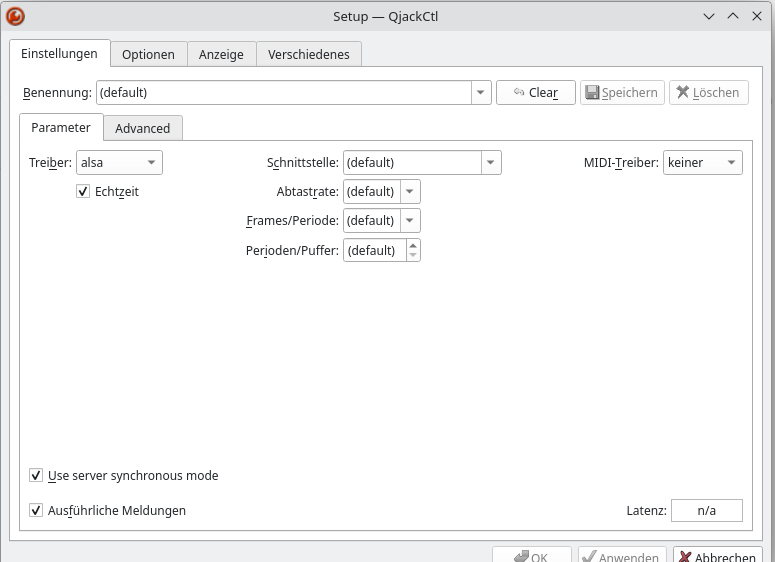
Da eine Reinstallation denselben Fehler brachte, schaute ich mir die Einstellungen in qjackctl an und setzte neu:
Mit diesen Einstellungen ("fürs erste!") ließ sich dann JACK-Server ohne Probleme starten.
Leider hörte man nichts. Kontrolle:
uer@systemname:~$ aplay -l
**** Liste der Hardware-Geräte (PLAYBACK) ****
Karte 0: PCH [HDA Intel PCH], Gerät 0: ALC897 Analog [ALC897 Analog]
Sub-Geräte: 1/1
Sub-Gerät #0: subdevice #0
Karte 0: PCH [HDA Intel PCH], Gerät 3: HDMI 0 [LG TV SSCR2]
Sub-Geräte: 1/1
Sub-Gerät #0: subdevice #0
Karte 0: PCH [HDA Intel PCH], Gerät 7: HDMI 1 [HDMI 1]
Sub-Geräte: 1/1
Sub-Gerät #0: subdevice #0
Karte 0: PCH [HDA Intel PCH], Gerät 8: HDMI 2 [HDMI 2]
Sub-Geräte: 1/1
Sub-Gerät #0: subdevice #0
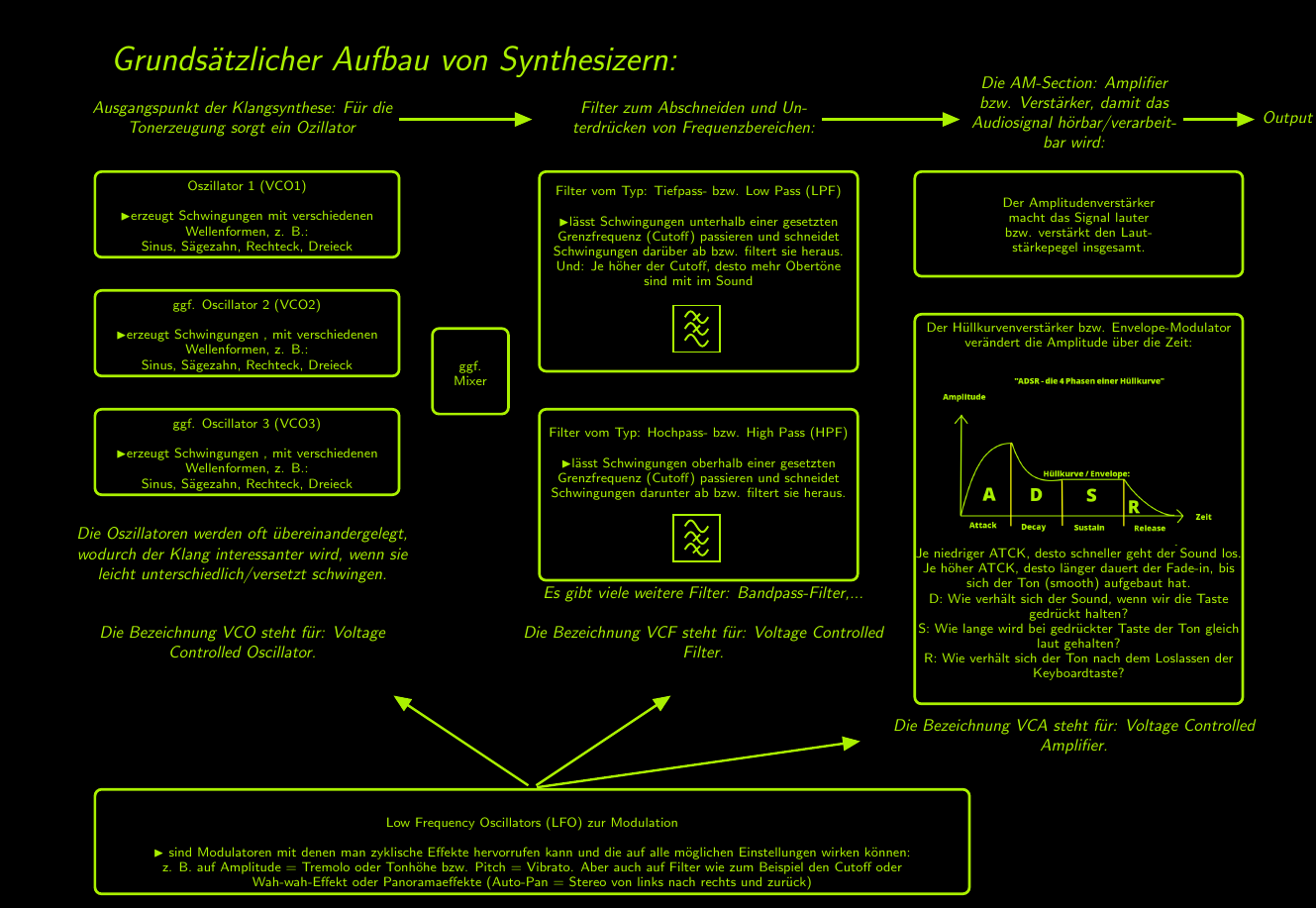
Synthesizer-related Infos:
AM (Amplitude Modulation):
VCA (Voltage Controlled Amplifier):
Ein VCA ist eine elektronische Einheit, bei der das hereinkommende Audiosignal mit Hilfe einer ebenfalls
zum VCA hereinkommenden (vom Benutzer veränderbaren) elektrischen Spannung (mit CV für Control Voltage)
verändert wird. Ist CV gleich null (oder negativ) wird das Audiosignal nicht mehr durchgelassen und
der Ausgang des VCA ist still. Die Hauptanwendung von VCA ist das "Envelope Shaping", d.h. die Veränderung
der Hüllkurve.
Envelope (deutsch: Hüllkurven):